





 Log In
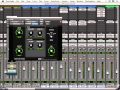
Reverb is perhaps the most misunderstood /misused effect in the mixer's toolbox today. In this timeless series, DAW superman Eli Krantzberg reveals everything you need to know about this mysterious effect and how to apply it to the most popular instruments in your productions.
Eli starts with a great overview of reverb in general, then breaks down the different sections found in the most common reverb plug-ins. He then shows you practical applications such as reverb on drums, vocals, guitars and even as special effects. He wraps up the series with some great tips on using automation to enhance your reverb effects.
Furthermore, the series is designed so that the information can be applied to any reverb plug-in, so you can start using what you learned immediately.
Let's face it, reverb is probably the most used effect in your DAW. Watch Eli and master this highly complex and important effect. Get "Reverb Explained" today.
Product Highlights
- 22 Tutorials / Over 3 Hours Total Runtime
- For all beginner to intermediate reverb users
- Information applies to any reverb plug-in
- Tutorials written by DAW master Eli Krantzberg
- Simple to use video control interface for Mac & PC
- Watch Online, Download, Stream to iPad, iPhone & iPod
Working with a Single Space
- Space, The Final Frontier (06m:30s) - Learn what the basic parameters found on most reverb plug-ins do, and how they relate to emulating the characteristics of a natural space.
- Dry Run (05m:23s) - Listen to a completely 'dry' (no reverb) rough mix, and see how to set up sends across all the tracks at once. This send will arrive at a common effects return track that will host a reverb plug-in, accessible in discreet amounts from every track in the session.
- A Common Space (14m:12s) - Explore the D-Verb interface and see how a single reverb instance can be used to unify an entire mix by situating all the elements in a common space.
- AIR Reverb & Early Reflections (10m:30s) - Discover the AIR Reverb interface, and see ways of blending together the early reflections portion of the signal with the reverb tail.
- Front to Back (08m:47s) - Learn how to use pre fader sends as a means of controlling the dry/wet mix on instruments within a single space, and how unique pre delay and early reflections can also be used to enhance the positioning within the virtual space.
Working with Drums
- Creating a Drum Room (12m:03s) - Learn how to set up an additional drum bus with a very short reverb that can be used to emulate the characteristics of a drum booth or small drum room.
- Bus Stop (07m:45s) - Explore ways of re-routing and creatively coloring the snare drum send before it reaches the reverb.
- Snare Shifting (07m:48s) - See how creating a duplicate and processed snare drum file is used for some creative reverb routing.
Working with Vocals and Guitars
- Convolution Reverb & Waves IR-1 (13m:45s) - Learn about convolution reverbs and impulse responses, and how to control their shape and tonal characteristics in the Waves IR-1 plug-in.
- Vocal Ambience (05m:17s) - Watch as we replace our reference vocal sends on the vocal tracks with a new bus assignment, and set up a short vocal ambience with a third party impulse response file
- Lead Vocal Preverb Processing (08m:24s) - Explore ways of processing the lead vocal before it arrives at the reverb. Using a delay between the dry and wet signal effectively establishes a unique pre-delay, separate from the other signals reaching the shared reverb.
- Dual Reverb Strategies (09m:31s) - See how to run two independent reverbs in series, as well as parallel, to establish a complex space. A post reverb compressor is great to create a swelling effect where the reverb is ducked as the dry signal is playing, and swells back up in the empty spaces.
- Pre & Post Gate Effects (10m:06s) - Stretch your mind with some ideas on how to gate signal either before or after arriving at a reverb return. And see how to combine a delay and gate together to create a reverb only “echo gate” effect.
- DelayVerb (06m:12s) - The real world doesn’t always demand in your face reverbs. See an example of how to combine some of the techniques discussed in the previous videos to create subtle tight vocal reverbs that help the parts sit well in the mix.
- Working with Mono Reverbs (04m:57s) - We often associate stereo reverbs with a big stereo field. Mono sends on mono tracks going to mono reverbs are another tool in your reverb arsenal. Panning dry and wet signals to opposite sides of the stereo field can create a different and interesting type of stereo image.
Reverb FX
- Creating Moving Reverse Reverb (06m:16s) - Watch as a reverse reverb file is created by applying a 100% wet reverb to a reversed dry file and then reversed back. Then add movement by panning to one side and sending to a reverb panned to the opposite side.
- CabinetVerb (04m:33s) - See how an amp cabinet simulator plug-in called the Torpedo PI-101 is used to color the send of a guitar picking part as it is routed to the drum room reverb.
- Reverb Combinations (07m:26s) - The remaining guitars are treated with different combinations of the existing reverbs; and the remainder of the sounds are sent to the main vocal reverb for ambience and continuity.
- Long Reverb FX (09m:38s) - Reverb is also useful for spot effects at specific locations rather than throughout. See how to create some interesting long reverb hits to accent the drum groove.
- In Your Space (05m:58s) - Automation is another method of bringing spot reverb effects in and out of the mix. Watch as we draw some rhythmic tempo synced send automation to create a pumping and swelling effect with the beat.
- Fade Out & Fade Away (05m:56s) - Learn how to set up and automate a reverb send while fading out the main volume, to create the impression of the sound fading into the distance as it is fading out.
- Review & Final Mix (18m:09s) - Recap and summary of the key points discussed throughout this series. After some final tweaking, listen to a complete run through of the final mix.
Installation Instructions
1. Follow this link and enter the serial that can be found in your Plugin Boutique User Account (Ableton Live Clip Tricks is used as an example)

2. Enter your serial and select Submit your code. Then select Proceed.

3. Fill in your details.

4. Because you have already purchased this course through Plugin Boutique you will simply just need to select Submit Order.

5. Select download.

6. You can now download your course.


