





 Log In
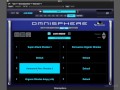
The Spehere Awaits You
Eli Krantzberg is back with a new series on the mind blowing Spectrasonics Omnisphere virtual synth. Eli covers it from beginning to end, demystifying all of its features and functions as well as ways to get creative with its awesome power.
Eli starts with detailed overviews of the Omnisphere user interface and then covers the basics such as navigating, browsing patches, saving your own patches and edit tags. He then goes into sound sculpting with the different types of synthesis available in Omnisphere, as well as ways to modulate, morph, filter and groove lock your sounds for even more creativeness. Next, Eli dives into the powerful arpeggiator, the Orb, the mixer section, Live mode, Stack mode and so much more.
If you use Spectrasonic Omnisphere in your studio or live rig, why not get the most out of it? New sounds equals new inspiration, and who doesn't need that? Enter Omnisphere Explained today...
Product Highlights
- 33 tutorials / Almost 4 hours total runtime.
- For all beginner to intermediate Omnisphere users
- Shot with the latest version of Omnisphere 1.5
- Tutorials written by DAW guru Eli Krantzberg
- Simple to use video control interface for Mac & PC
- Watch Online, Download, Stream to iPad, iPhone & iPod
Working with the Presets
- The Big Picture (08m:35s) - Learn how the hierarchy of Omnisphere’s sound structure and how the main interface elements are set up.
- Browsing the Browsers (06m:11s) - See how the browser functions are a sophisticated data base with options to display, sort, and return search results based on various attributes, key words and tags.
- Navigating the Patches (09m:45s) - Discover some of the ways of sorting and navigating through the Patch Browser’s search results field.
- Custom Navigation (08m:19s) - Explore ways of customizing the browser displays, and organizing sounds in custom projects.
- Save Patches & Edit Tags (09m:53s) - Learn how to create a new category and save an edited patch as well as assign and edit custom tags.
- Sample Thinning (04m:14s) - See how the Lite Version function is used for custom sample thinning to free up memory by loading in a subset of the complete sound source sample mappings.
Patch Control
- Main Page: Patch Controls (07m:25s) - Explore the patch wide functions on the Main page Controls tab, and how they can be used to influence how the overall response of the patch reacts when notes are triggered.
- Main Page: Layering Controls (08m:11s) - See how to easily modify and sculpt sounds form the filter and layer specific controls found on the Main Controls page.
- Patch Common Parameters (08m:36s) - The Edit Page is Santa’s Workshop, the belly of the beast where patches are conceived, born, and grown. Learn how to use the parameters common to an overall patch here as a gateway into designing and sculpting your own unique sounds.
- Anatomy of a Patch (07m:51s) - The basic model of all synthesis is to set up a sound, run it through filters to shape the frequency response, and modulate the filter, amplitude, or other aspects of the sound to create motion. Here we’ll take a simple oscillator waveform, run it through a filter, and use an envelope to create some modulation; as a means of demonstrating the basic anatomy of a patch.
Sound Sculpting
- Synth Oscillator Controls (07m:52s) - See how the main synth oscillator controls are used to shape the sound either statically or dynamically over time, and how the analog and phase knobs are used to introduce pitch and phase discrepancies between the two layers.
- Sample Mode Parameters (07m:38s) - Learn how the Main controls are used for shaping sample based sound sources.
- FM Synthesis (07m:) - Explore how the FM synthesis parameters are used to generate wildly oscillating pitch sweeps, gentle vibratos, and add musical grit and bite to your sounds.
- Ring Modulation (08m:09s) - See how the ring modulation parameters are used to multiply and modulate the amplitude of a sound source in interesting ways.
- Waveshaper (08m:54s) - Discover the unique ways Omnisphere can incorporate polyphonic distortion into a patch’s signal flow with the waveshaper parameters.
- Unison Mode (06m:49s) - Learn how to use the Unison mode controls to generate subtle, and not so subtle, thickening chorusing effects by adding up to eight automatically generated detuned voices.
- Harmonia (06m:56s) - See how the harmonia zoom functions take the Unison mode multiplier features to the next level by offering unique controls for each of the additionally generated voices.
- Granular Synthesis (07m:04s) - Learn how the granular synthesis parameters are used to split samples into thousands of tiny grains, and then edit their lengths, pan positions, pitches, and order.
Adding Motion
- Filter Basics (10m:06s) - See how Omnisphere’s filter and filter envelope controls work, and three built-in modulation pathways are used to vary the characteristics of the filter cutoff parameter.
- Working with Dual Filters (07m:31s) - Learn how Omnisphere’s dual filter system works, and how it can be used to generate complex frequency dependent rhythmic filter patterns.
- Working with Envelopes (08m:03s) - See how to create and edit ADSR and complex envelope patterns in the Envelope Zoom window.
- Chaos & Groove Lock (04m:31s) - Watch how to import and lock an envelope pattern to an external MIDI file or RMX groove, and how to use the chaos and auto chaos features to create variations.
- Modulation Routings (05m:58s) - See how modulation routings are created, managed, and edited on the Edit page and in the Modulation matrix zoom.
- Morphing Modulation (06m:13s) - Discover Omnishpere’s unique modulation feature that allows for cross fading between two modulation sources feeding the same target.
- LFO Basics (05m:48s) - Explore the various ways to control the repeating cyclical waveforms called LFOs as they are used as modulation sources.
- LFO Phase Offset & Triggers (03m:48s) - See how the phase offset and various trigger modes are used to control where in the waveform and when, in relation to the notes played, the LFO patterns are triggered.
Post Patch Movement
- Enabling Host Automation (04m:35s) - Learn how to enable parameters for automation within your host sequencer, and how to view a master list of all automation assignments.
- The Arpeggiator (10m:20s) - Explore the features of Omnisphere’s arpeggiator and see how it is used to take incoming MIDI notes and output them in customized sequenced patterns.
- The Orb (08m:46s) - Explore the wild sonic manipulation possibilities available with Omnisphere's Orb. Learn how to record and control its movements externally as you mangle patches in interesting and unexpected ways.
Multitimbral Techniques
- The Mixer - Explore Omnisphere’s mixer and FX sections, and learn how to set up the parts for multi-timbral and multiple output usage in Apple Logic Pro.
- Live Mode (08m:18s) - See how Live mode is used to override the individual part MIDI channel assignments, and allow for freely changing between parts via the mouse, key switching, and MIDI CC or program change messages.
- Latch & Trigger (06m:14s) - See how latch and trigger modes are used on the fly in Live mode to create real-time soundscapes.
- Stack Mode (09m:09s) - Learn how to set up note, velocity, or MIDI CC based splits, layers, and cross fades using Omnisphere’s Stack Mode.
Installation Instructions
1. Follow this link and enter the serial that can be found in your Plugin Boutique User Account (Ableton Live Clip Tricks is used as an example)

2. Enter your serial and select Submit your code. Then select Proceed.

3. Fill in your details.

4. Because you have already purchased this course through Plugin Boutique you will simply just need to select Submit Order.

5. Select download.

6. You can now download your course.


