





 Log In
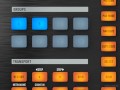
In this fantastic series, music tech master Russ Hughes takes you deep inside the software of the Native Instruments MASCHINE & MASCHINE MIKRO music production powerhouses.
Russ begins your journey with detailed overviews, setting preferences, using the browser, and how to drag & drop sounds. He then moves onto sampling, creating instruments and patterns, using the built-in synth, arranging, exporting audio and MIDI, using effects, automation, plug-ins and so much more.
MASCHINE is truly a full featured, professional music production tool. If you wanna rock it, Russ will show you how.
Product Highlights
- 38 Tutorials / Over 3 Hours Total Runtime
- For all beginner to intermediate MASCHINE & MASCHINE MIKRO users
- Tutorials written by music tech master Russ Hughes
- Simple to use video control interface for Mac & PC
- Watch Online, Download, Stream to iPad, iPhone & iPod
The Basics
- Hardware Overview (04m:23s) - Take a guided tour of the Maschine hardware interface that tightly integrates with the included software.
- Intro to the Software Interface (03m:36s) - Take a guided tour of the Maschine desktop software.
- Setting Preferences (06m:) - Get under the hood and figure out how to set up your Maschine to get the most out of it. This includes setting up audio, MIDI and preferences.
- Using the Browser (10m:45s) - See how to use the browser to navigate around projects, instruments, patterns, effects and samples.
- Find Things Fast (05m:08s) - If you're in a hurry and need to find things fast, here are some tips and tricks for speeding up your workflow.
- A Note about 64 Bit (01m:42s) - A short video explaining the benefits of 64 Bit mode and how to make sure you are working in 64bit mode both in Mac and PC.
Working with Samples
- Dragging Sounds from the Desktop (03m:41s) - In this video find out how to create drum kits by dragging and dropping sounds.
- Drag Loops into the Sampler (05m:06s) - In this tutorial you'll learn how to bring in a loop, edit it, slice it and then automatically create a pattern.
- Drag, Drop & Map Sounds (04m:40s) - Find out how to quickly build an instrument by dragging in samples from your desktop.
- Sampling from a DAW (09m:48s) -Find out how to sample from within your DAW using the powerful sampling engine. There are several ways to make life easy, Russ shows you how.
- Create an Instrument (07m:09s) - How to sample an instrument from within your DAW and then map it to create a great sampled instrument.
- Using the Synth Engine (11m:20s) - Find out how to use the powerful synth engine within Maschine's sampler to take sounds to a whole new level.
Building Beats
- Create a Pattern Fast (04m:14s) - A hit n run on how to create a pattern fast - perfect for those who just want to get up and running quickly.
- Creating Patterns In-Depth (15m:29s) - See an in-depth tutorial on putting a pattern together from scratch.
- Arranger Basics (03m:31s) - In this video find out how to take your patterns and build a complex song arrangement.
- Arranger Menus (01m:48s) - Discover how to use the menus and shortcuts so you can assemble songs fast!
- Arranger in Live Mode (04m:05s) - Want to arrange your songs on the fly? Well you can! Russ shows you how to build an arrangement that's flexible and can be used live.
- Applying Swing Grooves (02m:57s) - Give you beats some swing using grooves. In this tutorial we look at applying swings to the Master, Group and even individual parts.
Exporting Audio and MIDI
- Export Audio to Logic (06m:23s) - Find out how to get the audio from Maschine into the Logic timeline, there are several workflows and Russ shows you all of them.
- Export Audio to Pro Tools (05m:03s) - See all the different ways how to get the audio from Maschine into the Pro Tools time-line.
- Export MIDI to Logic (01m:45s) - Need to export your Maschine MIDI into Logic? This short tutorial shows you all the ways possible.
- Export MIDI to Pro Tools (02m:28s) - See how to export MIDI from machine into Pro Tools.
Routing Audio
- Routing Audio to Your DAW (04m:54s) - Find out how to route audio from Maschine into separate tracks within your DAW.
- Routing Audio within Maschine (05m:38s) - Explore Maschine's complex and powerful internal routing options and how to get the most from them.
Working with Effects
- Using Insert & Send Effects (10m:55s) - Learn to use Maschine's built in effects both as inserts and sends for maximum flexibility without overloading your computer.
- Maschine as an Effects Unit (04m:17s) - Want to use an effect in Maschine on another track in your DAW? Russ shows you a cool trick that allows Maschine's effects to be used on anything!
- Effect Automation (07m:38s) - Take control of your effects and automate all of their controls to drive them to the max.
- Tape Stop & Stutter Effects (06m:04s) - Combine all the skills and tricks you've obtained about Maschines effects to create a very cool tape stop and stutter effects.
- How to Use Resochord (06m:16s) - Discover how to take drum sounds and convert them into cool synth sounds using Resochord.
- Create a Dirty Drum Sound (03m:10s) - There's plenty of bite and dirt in the effects within Maschine. Find out how to take your drums and give them a filthy edge.
- Using FM & Frequency Shifter (12m:) - Unleash the power of FM synthesis and filters to create new sounds that have the edge.
- Using VST & AU Effects (02m:47s) - See how to easily use 3 party VST and AU plug-ins within Maschine.
File Management
- Managing a Project (05m:39s) - Don't lose a single thing by following these steps on saving your projects, patterns, groups and sounds!
- Taking a Project to Another Studio (01m:05s) - A short video showing how to ensure that you move all parts of a project complete with samples so you can take it to another studio etc.
Mapping and Assigning
- Mapping Your Hardware Controller (04m:05s) - See how easy it is to use the supplied software to map your hardware to any MIDI instrument or plug-in.
- Assigning Macros to Groups (02m:21s) - Discover how you can map your most used controls to Macros and get to them fast.
VI Instruments and REX Loops
- Using VST & AU Instruments (04m:58s) - Explore how you can insert and control your favorite VST and AU instruments within Maschine.
- Working with REX Loops (04m:03s) - Find out how to work with REX2 loops within Maschine and then create a brand new audio loop file of them.
Installation Instructions
1. Follow this link and enter the serial that can be found in your Plugin Boutique User Account (Ableton Live Clip Tricks is used as an example)

2. Enter your serial and select Submit your code. Then select Proceed.

3. Fill in your details.

4. Because you have already purchased this course through Plugin Boutique you will simply just need to select Submit Order.

5. Select download.

6. You can now download your course.


