





 Log In
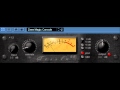
Product information
TesslaSE adds some gentle and pleasant saturation effects to the incoming audio.
System Requirements
Tips and Tricks
- Don’t use this in a single instance on just a bus or master but use it here and there in the mix channel inserts – the subtle effects sum up to obtain a more consistent mix.
- Use the SBE switch to obtain a deeper low-end impression.
Requirements
- Windows x32
Installation Instructions
Installation
1. To install TesslaSE, first unzip the file downloaded from the Variety Of Sounds Download Page.

2. Next follow the file directory - Computer / System (C:) / Program Files / Steinberg - and drag the .dll file into the Steinberg folder.

3. Open up your DAW and your software will now be ready to use.


