





 Log In
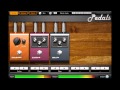
Pedals — is a VST effect plug-in for Windows, designed for processing electric guitar and bass. It is also possible to process other audio sources for a variety of artistic techniques.
For more convenience, Pedals' GUI simulates real devices for sound processing: guitar pedals, amplifiers, speakers, etc. There are a total of 20 models of pedals, 2 amps, 7 speakers models and 3 rack units. These devices are not a copy of the real-life models, each with their own sound, but their working principles are identical.
With just a few clicks you can select a combination of effects and create the desired sound. You can even create extra mood by choosing floor material under the pedals: house parquet, metal garage floor or studio carpet.
The built-in preset manager makes it easy to save the settings and quickly access them or share them with other Pedals users.
In addition, VST automation and full MIDI Learning are supported.
Features
- 20 Effects Pedals
- 2 Amplifiers
- 7 Cabinets
- 3 Rack Modules
System Requirments
Your computer must meet the following minimum requirements to run the Pedals:
- Pedals also has low requirements for PC performance (approximately 0.5% - 2% CPU Core2Duo)
- Intel or AMD Processor with at least of 500 MHz (1 GHz or higher are recommended);
- At least 512Mb of ram memory;
- Windows Operating System (Windows XP SP2, Windows Vista and Windows 7 are supported);
- Up to 20 Mb of free disk space;
- 1024x768 or higher screen with 16 bits or more colors;
- VST 2 compatible host.
Instalation Instructions
Tonebytes FM-Four is used as the example
1. Run the installer .exe file. Click Next to continue.

2. Read through ToneBytes license agreement and click "I agree..." to continue installation.

3. Select appropriate destination for the software and click Install to continue installation.

4. Select finish and now your software is now ready to use!


