





 Log In

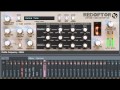
Redoptor is a high quality Vintage Tube Distortion emulator.
The popularity of tube distortion units are as a result of their superiority over the solid-state fuzz distortions which are based on transistor clipper circuits. Tubes produce even and odd harmonics and naturally compress the signal. Transistors produce only odd harmonics and limit the sound
In ordinary fuzz, when a signal goes over the threshold level it goes through the clipper circuit. As the signal volume falls back below the threshold (as the sound reaches its release stage), the harmonics added by clipping suddenly disappear. If the volume of a signal oscillates above and below the threshold, the clipping harmonics will appear and disappear with the signal level. This sounds unnatural and is unpleasant to listen to.
This does not happen in Redoptor. As the sound source falls in volume in its release phase, the harmonics (which were created by the sound being initially above the clipper threshold), gently disappear with the original sound. This creates a very sonically pleasing distortion.
Exact circuit emulation
Redoptor has an adjustable tube bias parameter. This allows subtle amplification of even harmonics and gentle transient reshaping in the signal. Similarly, like a hardware tube distortion, Redoptor reacts dynamically to each change in the amplitude of the input signal. As a result, the amplitude of even harmonics is not constant in time.
Redoptor has a very precisely modelled tube distortion module. The emulation doesn't just focus on the characteristics of the tube part of the circuit; it also models the rest of the circuits co-functioning with the tube within the distortion unit to capture all the subtleties and dynamics of proper high-quality analog tube distortion.
Completely adjustable preamp
In a typical guitar amplifier, the preamp is usually fixed. In Redoptor it is not. Redoptor allows the cut-off point for low and high tones to be set before the signal is amplified.
Parametric EQ
Redoptor has a full parametric equaliser with 4 controllable bands. This degree of EQ is rare in this type of device. Most typical amplifiers have a fixed graphical equaliser, with 3 or 4 bands and only allow gain of the signal in each band.
Independent stereo channel processing
Redoptor is not just for guitarists - who usually only require a mono signal path for distortion. Redoptor is a fully functioning stereo tube distortion with an independent path for each channel in the stereo signal. This allows each channel to have completely different harmonics and distortion added to it. Try doing this with synth sounds - the timbre will sound much more defined.
Unique character
Thanks to the perfect emulation of the electronic circuits within the various guitar amplifiers used to design and create Redoptor, Redoptor sounds as good as its real-world analog equivalent.
Guitarists will appreciate the quality of Redoptor. For them, the amplifier is indispensible. However, other instrumentalist and sound designers will also welcome the high quality distortion, rich harmonics and attitude which Redoptor brings to their sounds. Use Redoptor on guitar, drum loops, arpeggiated sequences, synthetic or acoustic sounds and youíll hear its warm, rich and truly unique character.
Awards
Features
- Exact tube and tube's circuits emulation
- Crossfade between tube and transistor distortion
- Adjustable power of new harmonics
- Tunable preamp filters
- Fully equipped parametric equaliser
- Presets organised into groups
- MIDI learn function
- 64bit internal processing
- Multi-mode distortion's quality adjustment
System requirements
PC
- OS: Windows XP, Windows Vista, Windows 7
- CPU: 2.8 Ghz with SSE (i7 based 3.7 GHz recommended)
- RAM: 1 GB (1.5 GB recommended)
- Software: VST host (32bit or 64bit)
Mac
- OS: 10.6.x or 10.7.x
- CPU: Intel based 2.8 Ghz with SSE (i7 based 3.4 GHz recommended)
- RAM: 1 GB (1.5 GB recommended)
- Software: AU or VST host (32bit or 64bit)
Install Instructions
1. Double click the installer and select Run.

2. Select Next.

3. Read through the license agreement and select Next.

4. Select where you want your software to be installed and then select Next.

5. Select Install.

6. Select Finish to complete installation.

7. When you load up your software it will be displayed as a demo version.

8. Go to https://userarea.d16.pl/index.php and create an account with d16, or login into your existing account with them.
9. Click on the link that allows you to unlock your software and enter the serial you received from Plugin Boutique. This serial can be found in your user account area or in your purchase confirmation email.
10. Download the keyfile and save it in the same folder as the initial installer file. Now the keyfile is saved onto your computer, your software will work.
11. Launch your software and click activate - a window will open that will ask you to point to the saved keyfile. This should have been saved in the same folder as your installer file.


