





 Log In

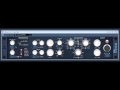
The epicVerb reverberation device aims at both: Tight small room and ambience effect simulation well suited to modern drum and vocal productions up to large “epic” halls as known from high quality outboard gear. This reverbs sound ranges from rather concrete or even edgy up to smooth, transparent and artifact free reverb tails. It is designed for maximum flexibility and usability and to take place as a true high quality stereo main reverb.
Features
- 6 different stereo early reflection models
- reverb tail modulation
- EQ section
- artifact free reverb tails
Requirements
- Win32 compatible system with SSE2 instruction set support.
- Tested and known to work in many VST compatible hosts.
Installation
1. To install Variety of Sound software, first unzip the file downloaded from Variety Of Sounds Download Page. (for demonstration purposes we're using the Density MKIII)

2. Next follow the file directory - Computer / System (C:) / Program Files / Steinberg - and drag the .dll file into the Steinberg folder.

3. Open up your DAW and your software will now be ready to use.


