





 Log In
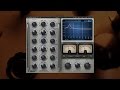

A passive equalizer with powerful sound-shaping capabilities, the RS56 Universal Tone Control was originally introduced in the early 1950s and used in Abbey Road Studios to prepare recordings for the record-lathe, as part of the process we now know as “mastering.” Later, Abbey Road’s pop engineers began using the RS56 for studio recordings because of its abilities to dramatically manipulate sound – unlike the basic treble and bass EQs found on the mixing consoles of the time. This earned it the nickname “The Curve Bender.”
Waves and Abbey Road Studios have faithfully recreated the unique magic of the RS56, using advanced circuit modeling techniques based on the original schematics. Like its hardware predecessor, the Waves: Abbey Road RS56 passive EQ plugin features three bands with four selectable center frequencies for each and six different filter types, plus independent or linked control over the left and right channels. The result is an extraordinary equalizer that is as effective today as it was when it was created over half a century ago.
Features
- Based on the legendary RS56 Universal Tone Control passive EQ
- Three bands with four selectable center frequencies for each
- Six different filter types
- Independent or linkable left/right controls
- Developed in association with Abbey Road Studios
Controls
- Bass Decibels sets the amount of low frequency boost or cut.
- Bass Width sets the shape of the filter.
- Bass Frequency sets the low frequency cutoff point.
- Bass On/Off deactivates low frequency processing.
- Treble Decibels sets the amount of midrange frequency boost or cut.
- Treble Width sets the shape of the filter.
- Treble Frequency sets the midrange frequency cutoff point.
- Treble On/Off deactivates midrange frequency processing.
- Top Decibels sets the amount of high frequency boost or cut.
- Top Width sets the shape of the filter.
- Top Frequency sets the high frequency cutoff point.
- Top On/Off deactivates high frequency processing.
- Output Level
- In Stereo and Duo modes: Controls the left and right channel levels.
- In MS mode: The left knob controls the Mid channel; the right knob controls the Sides channel level.
- Phase inverts the phase of the signal.
- EQ Mode selects stereo processing mode (stereo component only). Stereo relatively links the channels and applies the same processing to both. Duo unlinks the channels and offers the option of applying different processing to each. MS applies an MS encoding matrix on the input to the plugin.
- VU Meters display output VU readings.
- VU Level Calibration sets the dBFS level which appears as 0 VU.
System Requirements
PC
- CPU: Intel Core 2 Duo 2GHz / AMD Athlon 64 or equivalent
- RAM: 1 GB on XP, 2 GB on Vista / Windows 7
- OS
- WinXP 32-bit SP2 & SP3
- Vista Business 32-bit SP1
- Vista Ultimate 32-bit SP1
- Windows 7 32-bit
- Windows 7 64-bit (using 32 bit host applications)
- 1024x768 32-bit Display
Mac
- CPU: Core Duo 2.3Ghz
- RAM: 2 GB
- OSX Ver. 10.5.8 - 10.7
- 1024x768 Display
V9 supports 32-bit and 64-bit audio hosts.
Peter Cobbin
''The RS56 is a superb new software plugin of a classic and very rare outboard equalize. The original hardware is the grandfather of Abbey Road tone controllers''
Trial Version Installation Instructions
1.
Download the Waves Complete Web Installer. On a PC run the WOLI.exe file, on Macs unzip and launch the WOLI_V9.app. After you launch it you will see the following screen:

2.
Click on Continue. Read the License and then click Continue again. You will be prompted to Agree or Disagree with the License terms. Once you agree you will see a list of all Waves plugins and bundles, as pictured below:

2a.
If you are looking for the Single plugins they are at the bottom of the long list. They are there as a single collapsed item and you will need to click the small triangle next to the "Single Plug-ins" to expand and see the full list. Then proceed as normal.

3.
Tick the checkbox next to the product that you wish to have installed. This installer will take care of the download - this is what it will look like:

4.
Once the download is complete the installer will ask you to quit all running audio applications. Once you've done that the plugins will begin installation. This may take up some time so be patient at this point. When this process finishes - the installation is complete and you can run your trial version now.


