





 Log In
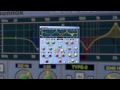
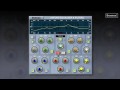
The renowned Oxford EQ is based on the original EQ section of the Sony OXF-R3 large format digital mixing console. It is a 5-band EQ with selectable shelf settings on LF and HF sections. Additionally, separate variable slope low pass and high pass filters are provided. The Oxford EQ also features four different EQ curves that cover a broad array of styles, including some legacy styles which are renowned for their artistic capability. The use of novel coefficient generation and intelligent processing design provides unparalleled performance that surpasses analogue EQ in both sound quality and artistic freedom. The Oxford EQ truly is four equalisers in one plug-in and will provide all the EQ you’ll ever need!
Features
- Fully 64-bit compliant
- 5 band fully parametric EQ
- Variable HF & LF filters up to 36dB/Octave
- Algorithm taken directly from the Sony OXF-R3
- Four different EQ types in one plug-in
- Fully de-cramped HF response
- A / B switches (automatable)
- Ultra low noise and distortion
System Requirements
Pro Tools
- Pro Tools 7, 8, 9 & 10
- Approved Pro Tools CPU, OS and hardware configuration : avid.com
- Mac OSX 10.4 or later /
- Windows XP / Vista - 32 & 64 bit / Windows 7 - 32 & 64 bit
- RAM 1GB minimum
- iLok key with latest drivers
- 2nd Generation iLok required for AAX plug-ins 2
Audio Units
- Pro-Codec is compatible with Intel Mac only
- Audio Units compatible application (Logic, Digital Performer etc.)
- Mac OSX 10.4 or later
- RAM 1GB minimum
- iLok key with latest drivers
- 2nd Generation iLok required for 64-bit plug-ins 3
VST
- VST compatible application (Cubase, Nuendo, Wavelab, Sequoia etc.)
- Mac OSX 10.4 or later
- Windows XP / Vista - 32 & 64 bit / Windows 7 - 32 & 64 bit
- RAM 1GB minimum
- iLok key with latest drivers
- 2nd Generation iLok required for 64-bit plug-ins 3
All Sonnox plug-ins are compatible with Mac OSX 10.7 Lion
Activation
To activate your Sonnox software please follow these simple steps.
Please note you need an iLok and an iLok account in order to activate your Sonnox Software. If you do not have an iLok, it can be purchased here and your account can be created here .
1. You will find your serial number in your Plugin Boutique user account and purchase confirmation email.
2. Visit http://www.sonnoxplugins.com/ws/pub/register/register1.html
3. Read the Sonnox Software Licence Agreement. Click I Agree at the bottom of the page.

4. Input your serial number received from Plugin Boutique into the Activation Key box and click Proceed. (Your serial will be 14 characters)

5. Complete the Customer Registration Page

6. Click Authorise

7. Enter your iLok account details, then click Submit


9. Your iLok account will have now been updated and you will be able to download the installers and manuals for your Sonnox Software.

10. Finally sync your iLok with your iLok account to transfer the licences to the iLok.


