





 Log In
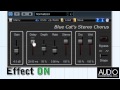
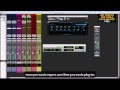
From a light ensemble to a deep destructive modulation effect, Blue Cat's Chorus can just do anything, for free! The Chorus effect was originally designed to simulate several voices, just as if several persons were playing together the same notes, but with a variable delay between them. This is one of the typical effects that you can get with Blue Cat's Chorus.
This plug-in also enables you to drastically change the original sound and create deep pitch modulation or crazy 'bubbling' effects. With the additional "Spread" control on the stereo version, the famous stereo widening and head spinning chorus effects are a few click away.
Features
- Single voice vintage chorus effect.
- Stereo spread control.
- Sine or triangle LFO shapes.
- In or out of phase mix control.
Blue Cat Audio Standards
- Available as: Mac-AAX, Mac-AU, Mac-RTAS, Mac-VST, Win-AAX, Win-DX, Win-RTAS, Win-VST, Win x64-DX, Win x64-VST.
- Native DSP code for optimal performance.
- Full MIDI control and automation support with silent, zipper-free parameters update, advanced response control and MIDI Learn.
- No CPU load on idle: when the plug-in is fed with silence, the processing smoothly shuts down, to optimize the CPU usage of your Digital Audio Workstation.
- Skinnable and customizable user interface with transparency management.
- Smooth Bypass: activate/deactivate the plug-in with absolutely no noise.
- Undo/Redo.
- Full featured integrated presets manager.
- Any sample rate supported.
Supported Platforms
- Mac-AAX
- Mac-AU
- Mac-RTAS
- Mac-VST
- Win-AAX
- Win-DX
- Win-RTAS
- Win-VST
- Win x64-DX
- Win x64-VST
Installing on Mac OSX
1. The plugin is delivered as a downloadable .dmg file. Almost every internet browser will open the file right away, mounting a disk on your desktop. If not, please locate .dmg file and double click it.

2. In order to install your VST plugins, drag and drop the vst bundles to the "VST Plugins Folder" alias, or copy them manually to the /Library/Audio/Plug-Ins/VST folder manually so that your favorite host application can find the plugin.
Installing on Windows
1. Run the installer .exe file. Click Next to continue.

2. Read through Blue Cat Audio's license agreement and click "I agree..." to continue installation.

3. Select which components you wish to install from the freeware bundle and click Next to continue installation.

4. Select appropriate destination for the software and click Install to continue installation.

5. Software installation will commence.

6. Your software is now ready to use!


